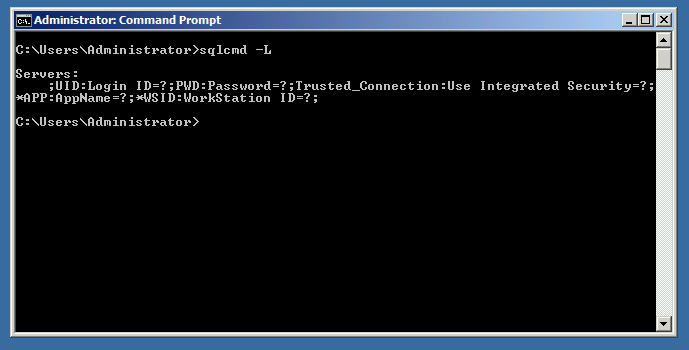
I was recently playing around with sqlcmd and wanted to list the SQL Servers on my server. When I ran “sqlcmd -L” I got the below output:
 Continue reading “SQLCMD -L Not Listing Your Servers? Try This”
Azure Data & AI Consultant
I was recently playing around with sqlcmd and wanted to list the SQL Servers on my server. When I ran “sqlcmd -L” I got the below output:
Continue reading “SQLCMD -L Not Listing Your Servers? Try This”
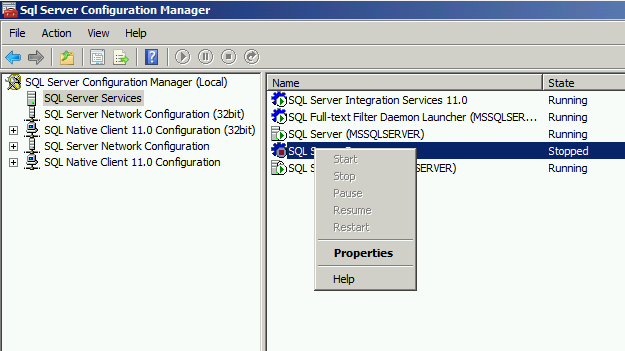
Recently a developer approached me at work and said, “I Can’t Start SQL Server Browser”
So, I logged into SQL Server Configuration Manager and saw that SQL Server Browser was stopped / off. When I right-clicked the SQL Server Browser to turn it on, I got this:
If for some ODD reason you want to disable Intellisense in SQL Server Management Studio, there is a very easy way to do so.
Open SSMS – Click on Tools, Options, Expand Text Editor, Transact – SQL, and then click on Intellisense (check screenshot below) Continue reading “How to Enable or Disable Intellisense in SSMS”
Most recently I had to create a SQL Logon trigger that set a limit to sessions a user could open in SQL Server.
For example, I log into SSMS and cannot open more than 10 sessions. This logon trigger will enforce that I don’t exceed 10 concurrent sessions. Continue reading “How to Create LOGON Trigger in SQL Server”
Memorizing DBCC commands (or any command for that matter) can be difficult if you don’t use it often. Thank goodness for the folks at Microsoft for creating the DBCC HELP command. Below is a quick way to use DBCC HELP to figure out any command (with syntax) that might have slipped your mind. Continue reading “How to use DBCC HELP”
If you want to do a quick and simple exercise to view blocking transactions on your SQL Server machine (code at bottom of blog).
I create a dummy table called “BlockingTable” and insert 10 rows of data. I then open a transaction and doing a simple update of the table. I leave the transaction open and open three new sessions. Continue reading “Use sys.dm_os_waiting_tasks to Find Blocking Transactions”
I attended my second Northern Virginia (NOVA) SQL User Group session last night. The session was called, “SQL 2016 – Cool New Features” by Microsoft SQL PFE Harsh Deep (blog) Continue reading “NEW Features in SQL Server 2016 – User Group Notes”
This blog post is meant to help distinguish the differences between REORGANIZE and REBUILD when it comes to index fragmentation. If you are serious about learning more of the internals of how indexing works in SQL Server, watch Kimberly Tripp’s (blog | twitter) video called, “Index Internals” here (open link and scroll down to “Index Internals”). Continue reading “INDEX REORGANIZE vs REBUILD in SQL Server”
Most recently I had to figure out the edition (Enterprise, Standard, etc.) of SQL Server running on a specific production database server. The client wanted to know to what extent was the database server STIG’d. Continue reading “How to Find SQL Server Edition Information”
For the longest time I’ve had a hard time remembering the difference between SQL Server DDL vs DML statements. I had a hard time remembering what statement fell under what category. Was INSERT, UPDATE, DELETE a DML command or DDL? What about CREATE / ALTER? It was all confusing to me. Continue reading “SQL Server DDL vs DML”
It’s usually something simple that’s overlooked that ends up causing the biggest troubleshooting headache. Let me explain. I was creating a test database called “testDB” with a test table called “testTable” (yes I know, I put a lot of thought in the naming of these objects) and when I tried to insert data into this new testTable I got the following error:
Msg 208, Level 16, State 1, Line 1 Invalid object name ‘testTable’.
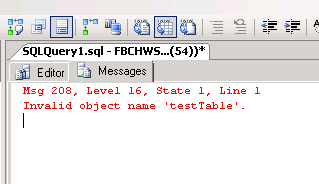 What the hec? How can it be an invalid object? I just created it! Continue reading “What’s Msg 208, Level 16, State 1, Line 1”
I attended my very first SQL Server User Group meeting last night and it was awesome! I want to start by giving my friend Tim Radney a BIG thank you for telling me about the importance of attending these sessions!
THANKS brother!
I joined the Northern Virginia (NOVA) SQL User Group a few weeks ago and attended my very first session last night. The session was called, “Hands-On Lab- Migrating a SQL Server Database to a Microsoft Azure SQL Database” and it was an online lab. Continue reading “My First SQL Server User Group Session”
I was fortunate enough to attend IEPTO1 (Immersion Event on Performance Tuning and Optimization part 1) by Kimberly Tripp (twitter) and Paul Randal (twitter) of SQLSkills this past Spring. It was absolutely amazing! If you are a DBA, developer, or just an IT tech geek who loves to learn then you must attend this event. Find registration information here. Continue reading “My Review of Immersion Event on Performance Tuning and Optimization 1”
There were a few times where I had to delete/close an existing SQL Server Trace and create a new one. It’s a 2-step process to completely remove a SQL Server Trace. First, you stop the trace. Second, you delete/close it.
sp_trace_setstatus takes 2 parameters, trace id and status. Continue reading “How to Stop & Delete a SQL Server Trace”
I recently created a database called “testDB” and when I typed “USE testDB” in the SSMS Query window it gave me a little red squiggly underline (see below snapshot).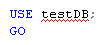 Why did this happen when I just created a new database? That’s because the local IntelliSense cache hasn’t updated yet. Continue reading “How to Refresh IntelliSense Cache in SSMS”